


Maximize Your Success with a Focus Group
Leading a focus group–and managing the participants–is never dull work. Recently, EnVision consultants moderated five focus groups, all part of a strategic training needs assessment for a client. The two EnVision moderators wanted to learn more about the company’s current capabilities and training needs in the areas of management, technical, and professional skills. For each group, EnVision gathered 8-12 employees.
As one session began, a focus group member (“Gloria”) started to dominate the conversation. Unfortunately, the dynamic in the focus group then changed. Other focus group members started to lose interest in the discussion. If the situation had continued down this path, the facilitators would lose valuable feedback.
How did the EnVision moderators turn things around? First, they simply thanked Gloria and did not probe her responses any further, focusing on the other group members. Yet, Gloria did not take the hint, so the moderators moved on to other tactics including using body language and, eventually, interrupting her. These approaches eventually solved the problem. What other tactics could a moderator use?
One helpful approach is to begin a focus group by establishing ground rules that encourage and allow all members to participate. One rule could be that participants will be asked to write down their thoughts if they have more to share than time allows. The moderator then would collect these thoughts at the conclusion of the focus group. When someone talks for too long, the moderator would simply redirect him to write down additional thoughts on paper.
Kathy Maloney, an EnVision consultant experienced in running focus groups, will often ask a talker, “Can you headline your thoughts for us?” This tactic prompts the talkative participant to summarize his key points.
In any attempt to redirect the loquacious participant, non-verbal cues such as eye contact are key, says Maloney. “I believe body language is very important in focus groups.” Another body language cue the moderator could use is moving toward or away from the individual.
EnVision learned something from this focus group experience. Sometimes you do need to cut a talkative person off, if his/her over-participation is limiting others from sharing their thoughts. The success of a focus group depends greatly on the moderators’ ability to balance participation. Because focus groups can be expensive to run, it is crucial that they yield a variety of opinions. “The moderator always needs to balance the contribution of one, versus the contribution of many,” explains Maloney. “What you want with a focus group is good qualitative information…you get ideas building between people that you can’t get with a paper survey.”
Tips to Redirect a Talkative Focus Group Member
- Set ground rules at the beginning of the focus group
- Use—or stop using—eye contact to disengage an overly talkative participant
- Use body language to let the loquacious speaker know he has talked enough
- Ask a focus group member to summarize her key points, as needed
- Direct a talkative individual to write down key points
- Interrupt the garrulous individual
Don’t Just Check Your Training Off
This summer, I traveled with my family to Europe, visiting Paris and the Louvre. We had the opportunity to see many artistic works at the Louvre, including Venus de Milo, Winged Victory of Samothrace, and the Mona Lisa.
Seeing both Venus de Milo and Winged Victory was wonderful. I could stand in front of each sculpture for as long as I wanted, and could take the time to appreciate the beauty of each, observing the similarities and differences between them.
Viewing the Mona Lisa, however, was a completely different story. Because of the long queue to see the famous da Vinci masterpiece, it took 20 minutes for me to arrive in front of the painting. After an insufficient moment of viewing, I was hurriedly ushered away by security guards.
Although the Mona Lisa is the most famous exhibit in the Louvre, I barely remember the moment I saw it. Because I was rushed through my viewing, I felt I was merely “checking it off the list,” rather than enjoying and relishing the experience, as I hoped to.
This incident reminded me of my work in the training world. Instructional designers can create a training program that is a masterpiece, but if the training environment is less than ideal, the training may not be successful.
There are three conditions that will help maximize the success of any training. First, an organization should provide a comfortable room for training with the necessary technology required for the class. Also, the learners typically need an opportunity to practice what they are learning, for example via role play or a quiz – whatever method will help them best apply their new knowledge.
Finally, the organization’s management must allow adequate time for the learners to process the information. Too often managers obliquely encourage employees to race through the training process in an effort to “check it off the list,” rather than taking the time to create the best possible “experience” for the learners. That experience extends well beyond the time spent in the training event, whether an instructor-led or online class.
What are you merely “checking off your list” throughout your workday? Training your employees is too essential to your organization’s bottom line to hastily “check off.” Make sure your training environment promotes and supports learning. Don’t rush the experience.
Why Take a Risk?
Risk. For some, the word alone elicits heart palpitations and visions of scary maneuvers. Why risk—why bother? It would certainly be easier to maintain the status quo in our lives, both personally and professionally. We would get some satisfaction from our lives and have nothing to lose. Yet, by playing it safe, are we really coming out ahead? That’s because the flip side of risk is a higher level of performance, more confidence, and ultimately greater success.
In addition, there is much more, well, risk to life if we don’t take risks. In his online article, “The 40-30-30 rule: Why Risk is Worth It,” Michael Schwalbe cites studies from Harvard psychologist Daniel Gilbert, who learned that people end up regretting things they don’t do much more than the things they do. Additionally, Gilbert learned that people handle failure better than they anticipate they will.
“Indeed, to improve at anything, we must at some point push ourselves outside our comfort zone. Body builders call it the ‘pain period,'” Schwalbe writes: “Only by trying something new, struggling, learning, and then trying again do we improve our performance.”
Well, sure, there are benefits to taking that leap. But don’t the dangers outweigh the advantages? Not if one is prepared, argues Bill Buxton in “Why Risk is Important.” As an experienced ice climber, Buxton ensures that he is well prepared for every climb, by considering four crucial factors: training, tools, fitness, and partners. And with a little creative imagination, one could apply those factors to any risky situation, mitigate the dangers, and reap the rewards.
I know, because I took a major risk last year.
In 2011, I decided to challenge myself and go on a gorgeening adventure, where I traveled down a gorge from top to bottom. I decided to do this because I wanted to push myself in a way I hadn’t before. The adventure started when we rappelled down a cliff onto a rock in the middle of a raging waterfall, the first of many. We shimmied on logs over waterfalls and swam across rapids. Halfway through, I wondered why I decided to do this. I was afraid of getting hurt, and I was exhausted. When I got to the 10-foot cliff, I hesitated before finally jumping off the top into the rapids. While this was one of the most exhausting and risky experiences I have ever had, I felt exhilarated at the end. I appreciated my courage and the strength I didn’t think I had. Taking this risk gave me the chance to experience not only my strength, but also the absolute beauty of the gorge, from a perspective few would get to see.
This risk reminded me of starting up my instructional design business years before. I left the security of working for an employer to rappel into the raging rapids of starting my own business. It was exhilarating, exhausting, and scary. Finally, I could choose which projects I wanted, those for which I had a passion. Yet, I couldn’t predict the next project or paycheck. Though I took the plunge, I appreciated the guides who supported me—from coaches to marketing and finance experts and instructional designers to documentation specialists. And the people who still hold the end of my rope today help my business be much more than what I alone could achieve. My success with clients has helped me “enjoy the view” along my journey.
What are you afraid of that is holding you back? What are the risks you might take that could pay off in a big way? How can risk guide you in your business decisions and in your training designs?
What’s in a Game?
Margie and Alex are each leading a classroom-based course on coaching employees. They use quotations to help the learners process the attributes and benefits of effective coaching. The course is delivered to two different groups comprised of similar learners.
In the first session Margie posts flip charts around the room. Each chart contains a quote with blanks for some of the key words. She then divides the learners into three teams, giving each team an equal number of words that belong in the blanks. Teams have two minutes to place their words in the correct blanks. Teams then earn points as follows: three points per correct placement; minus one point for an incorrect placement; two points for being the first team done.
In the next session, Alex knows about Margie’s plan but wants to save time. He hands out the quotations on a sheet of paper and asks learners to take a minute to read them. He then moves on to the next topic.
Which teaching method was more effective? What made it more effective?
Margie created a “game” to help teach her points. The way she crafted the game enables learners to process information about all the quotations. Motivated by scoring, teams had the added benefit of needing to strategize to win. Learners reported that they learned the content better than had they simply read it.
What’s in a game? Using a game as a teaching approach can help improve learning. In an article entitled “Designing Games for E-Learning: A Framework” by Purnima Valiathan and Puja Anand published by ASTD in 2008, the authors describe three factors included in most games. Those factors are scoring, strategy, and message. While a game need not include all three factors, it must include scoring, according to the authors.
• Learners score by earning points based on correct responses. They may also lose points for incorrect responses.
• Strategy enables learners to maximize their scores. For example, there might be “bonus” rounds.
• The message ensures the game relates to the learning objective.
Describe a game you’ve designed. What learning objective prompted you to create the game? Which factors were used? What was the benefit to learning?
Evaluation Enhances Blended and Online Learning
EnVision Performance Solutions and our elearning collaborator, Illumina Interactive, recently competed in the LINGOs (Learning in Non-Government Organizations) Global Giveback 2 Competition. Having developed dozens of online/elearning courses in the past few years, we jumped on this opportunity to “push the envelope” and integrate a variety of approaches.
For the competition we worked with Management Sciences for Health (MSH) in Cambridge, MA, to develop Coaching for Results, a highly interactive six-module, web-based course that introduces the value of coaching and provides learners with the ability to use MSH’s five-step coaching model. Learners have nine weeks to complete the course, which is moderated by an online instructor.
We integrated a number of evaluation approaches in the course designed to engage learners, help them learn, and provide feedback to both learners and the course instructor. As with instructional design for face-to-face instructor-led learning, we based evaluations on the learning objectives and spent some time in the planning phase to ensure evaluations were functional and relevant. Here are some of the approaches we used.
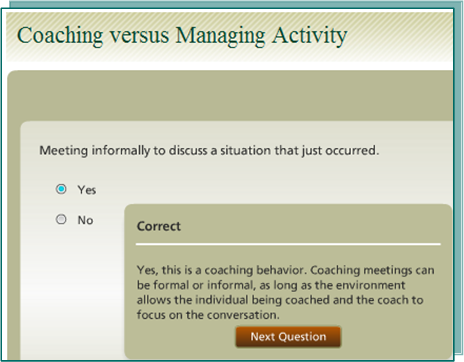
Quiz-type questions may be the most common type of evaluative components in online courses. We used them to reinforce learning as well as a level 2 evaluation of learners’ knowledge. For example, after being introduced to the differences between coaching and managing, learners are presented with a series of seven situations for which they must determine if the situation is an example of “coaching” or not. This series is not scored and feedback provides an explanation of the correct response.
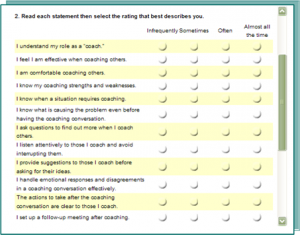
Surveys can help engage learners and provide the course instructor with a before and after comparison of learners’ perceived skills and knowledge, a combination level 3 and 2 evaluation. At the beginning of the course learners respond to a series of statements that best describe how frequently they do, or are aware of, coaching-related actions and knowledge. The same statements appear at the end of the course. Statements include “I handle emotional responses and disagreements in a coaching conversation effectively” (level 3) and “I know my coaching strengths and weaknesses” (level 2).
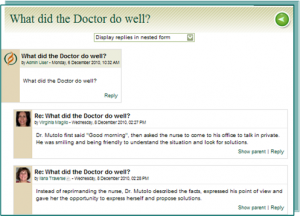
Discussion forums can help learners process what they are learning and share their thoughts and ideas. Throughout the course, we leveraged Moodle’s discussion forum to ask a variety of level 2- and level 3-type questions.
For example, after viewing a “photo novella” vignette of a manager (who is also a doctor) coaching his employee, learners are asked, “What did the doctor do well?” In this level 2 activity, learners apply the basic knowledge they’ve learned in the course. The instructor may comment on discussions to reinforce correct responses and correct or redirect incorrect responses.
Another discussion asks, “What gets in the way? What are the challenges you face?” This provides the opportunity for learners to consider coaching in their real-life situations and begin to see how they can apply the skills they are learning to their own workplace, a level 3 evaluation activity.
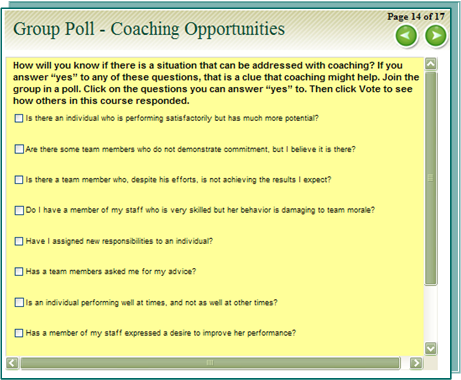
Polls offer a fun and interactive way to engage learners while obtaining information about their level of skill or knowledge. Learners respond to the poll, and then see how other course participants responded.
We used a poll asking learners to identify their actual coaching opportunities by selecting from a list of “coaching cues.” This approach also helps set context for the learners, enabling them to identify ways they can readily apply what they learn throughout the course. The instructor can also use the poll information in a follow-up questionnaire after the course.
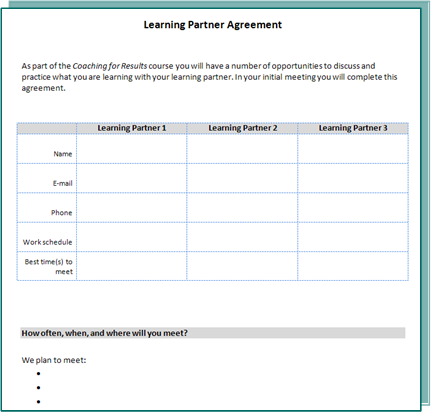
Learning partners, in which learners pair up to help each other learn, are a critical component of our course. Near the beginning of the course, we ask participants to complete a learning partner agreement and send it to the course instructor who follows up if the agreement is not sent in. Throughout the course, learners are instructed to complete a learning partner activity that includes:
- Discussing key points in the course
- Sharing ideas of how to apply what they learned to a specific work situation
- Practicing skills with each other before using them with employees
In follow-up discussion forum questions learners share key points from their learning partner experiences. The course instructor, following prompts in an instructor guide, monitors the discussions and offers guidance. Learners have the option of continuing their partnership after the course.
Those were some approaches we used, and we’d love to hear your thoughts and questions as well as your own tips for integrating evaluations into online learning. Oh, and the LINGOs competition I mentioned at the beginning? Yes, we did win! At this year’s eLearning Guild Learning Solutions Conference and Expo, EnVision Performance Solutions and Illumina Interactive were awarded first place in the corporate developer category for Coaching for Results. We continue to push the envelope to develop exciting, engaging, and effective courses.
Learner Feedback On-the-Go: Formative Level 1 Evaluation
Blank stares? Smiles? Droopy eyelids? How is your class going?
In this e-letter we’ll explore methods to better evaluate learner reaction throughout a class (formative evaluation), rather than relying solely on physical symptoms (which may not be sending the intended message) or waiting until the end to have learners complete a (summative) course evaluation.
Why collect formative data during a class?
According to Wendy Kayser Kirkpatrick, “So much is invested in reaction sheets that are only summative in nature. While this is good and important data, it’s too bad that so many professionals overlook opportunities to gather data during the course. The benefits of doing this are:
- Something may be able to be done to correct problems.
- It may open the door to conversations with more in-depth information than a [course evaluation] reaction sheet typically provides.
- It doesn’t add any time or cost to measure during the course itself.”
Here are just a few ways to collect formative feedback.
1 – Show of hands
Check in for quick, immediate feedback by asking a question requiring a show of hands. For example, “Who already knows how to …?” or “Who has performed this task on the job before coming to class?” This will help you evaluate the participants’ knowledge level and adjust accordingly.
2 – Dashboard
In a check-in sheet that looks like the dashboard of a car, learners rate items such as pace (speedometer), amount of content detail (temperature gauge), and energy level (fuel gauge or even the view out the window).
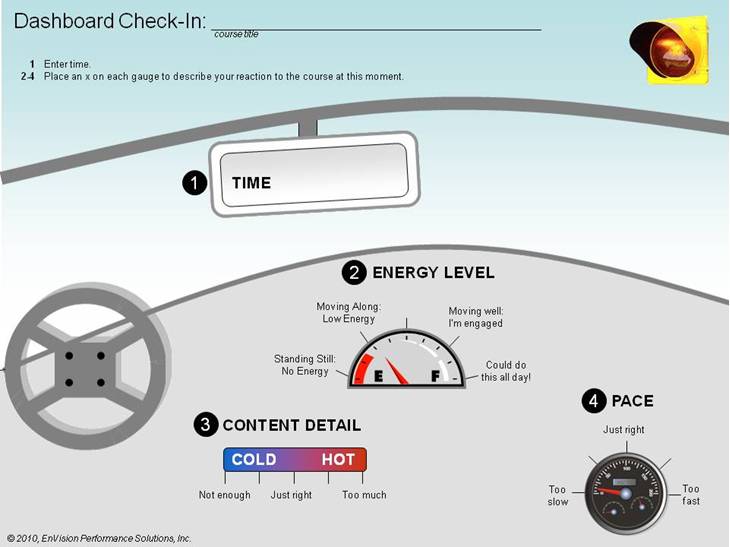
Provide learners with a pile of dashboards and, at specified moments throughout the course, ask them to indicate their personal measures for each dashboard item at that time. This provides specific data regarding a point in time and can be used to fine-tune the course. You can review the dashboards during activities or breaks for immediate feedback. You can use the following sample dashboard, available here as a pdf.
3 – Flipchart check-in
As learners begin a scheduled break, ask them to indicate their reaction to the course so far on a prepared flipchart. Be sure to determine what is most important for you to know and write those one or two questions on top of the flipchart. For example, write “This course is…” and draw a line with descriptive anchors at each end (too slow/too fast or not engaging/very engaging). Learners place an x based on their reaction to the course so far. Or, prepare an open-ended question such as, “What I like most about this course so far is…” You can provide Post It® notes to avoid crowding at the chart.
4 – Plus/delta
Just before lunch break or at the end of the day for a multiple-day course, facilitate a brief “plus/delta” session:
- At the top of one flipchart write a plus sign (+) or the question “What is going well?” Ask participants, “What do you like about how the training is going so far?” and “What should we keep doing?”
- At the top of a second flipchart write a delta sign (?) or the question “What would you like to see done differently?”
- For each set of questions, elicit responses about content, level of detail, pace, and engagement and chart the responses.
Try implementing one or more of these mid-course evaluation techniques the next time you are training. Adjust the course to your audience in each class to maximize learning for the class as a whole. Keep in mind these techniques augment, and don’t replace, regular check-ins you do throughout a class such as “visiting” groups during activities or asking what questions learners have as you cover each topic.
We’d love to hear from you! Let us know what you’ve tried and the outcomes.
10 Tips for Subject Matter Experts Who Deliver Training
Are you, or is someone you know, a subject matter expert who delivers training?
As companies continue to streamline their expenses, they are calling upon subject matter experts more and more to prepare and deliver training. If that describes you, read on for useful tips before, during, and after the training event.
Before the Class
There are a number of things you can do before a class to ensure the attendees (actually, I prefer to call them “learners” as a constant reminder of their role in the classroom) are engaged and to help them transfer learning to their jobs.
1. Help managers help you
Consider this question: What do the learners need from managers in order to successfully apply on their jobs what they learn in your classroom?
Certainly learners need managers to free up their schedules for the time they participate in training. It is also helpful for managers to know the course objectives and key points so they can ask learners specific questions about the class. When managers have access to a course overview – perhaps via a short webinar – they are more likely to be able to support the training and help transfer learning to the job. Add even more value by recommending ways for managers to remove obstacles to learners’ job performance. For example, if you are teaching about a new process and the computer system supporting that process isn’t fully functional, what suggestions do you have to work around the issue?
2. Talk with the audience
You know what they say about assumptions. So, don’t assume you know your audience until you’ve spent some time with them. Speak with a sample of the audience ahead of time to help you ensure the training is relevant.
- Do learners have the level of experience you anticipated?
- What is getting in the way of applying what they will learn in class to their jobs?
- How do they like to learn (e.g., through activities, pictures, discussions, case studies)?
3. A picture is worth, well, at least a 100 words
It’s true. A well-done diagram, flowchart, or other graphic can rapidly convey what might require many, perhaps hundreds of, words. In fact, some learners absorb the information much more effectively when you present it graphically. Need help? Check your version of PowerPoint to see what tools are available for creating flowcharts and other graphics. Or maybe someone on your team enjoys creating diagrams and would be happy to assist you.
4. PowerPoint slides ? your notes
If you use PowerPoint, use slides to illustrate your main points with appropriate graphics. You know your stuff, so list key points as succinct phrases rather than complete sentences. They will be all you need to prompt you to cover salient information. If you need more details, use the notes section of PowerPoint. When you print out the Notes Pages, you have an instant instructor guide.
5. Prepare, prepare, prepare
Subject matter experts, just as highly experienced trainers, need to prepare to deliver training. It’s not only about the content, but also about facilitating and anticipating.
- What questions will you ask learners to get them involved and thinking about the content?
- What activities will you facilitate, and what are the instructions?
- What materials and equipment do you need?
- How will the room be set up?
- What questions do you anticipate the learners will ask you?
Doing a dry run, with a small audience, will help ensure you’ve thought of everything.
During the Class
6. Don’t take a stand
Moving around the room helps you engage learners as well as manage your adrenaline. Think about where you’ll be moving, where learners can see and hear you best, and how you’ll integrate your location in the room with visuals. Avoid pacing back and forth and, please, avoid the spotlight. In other words, don’t stand in front of the projector!
7. Don’t tell all
You are the subject matter expert and, by definition, you likely know a lot more about the topic than those in your class. That said, learners would be overwhelmed to hear everything you can tell them. So, stick to your plan and focus on what your audience needs to know to achieve the course objectives.
8. Engage learners
There are many ways to engage learners, which you would plan during preparation. Here are a few:
- Explain the purpose and goal of the course.
- Tell compelling stories that illustrate your point.
- Include (and don’t cut) an activity for each major learning point.
- Create activities that require learners to do something physical, such as move around the room or chart their findings.
- Provide clear instructions for activities.
- Ask questions to get learners to state the key learning points.
9. DO NOT READ
If you’ve prepared thoroughly, you won’t need to read detailed notes. Simply refer to key points you might have made in your PowerPoint notes to keep you on track.
After the Class
10. Your job continues
Once the class is done, you aren’t. Here are some post-class activities to plan for:
- Follow up on outstanding questions or actions you committed to.
- Check in with learners via e-mail or set up a “group” via company intranet or other appropriate type of social media to keep open communication and support ongoing learning.
- Continue to support learners’ managers to help ensure the learning will “stick” and your efforts will have an impact.
If you will be training in the near future, use the 10 tips to guide you. Consider scheduling time right now to give yourself adequate time to prepare and follow up.
Does Your Training Support the Business Needs?
Imagine this: Your department manager, division VP, or training director asks you to develop training on effective communications. What do you do? Jump to action and create the course? Or ask questions to identify the business drivers, operational gaps, and performance gaps to ensure the course you create delivers results to the business?
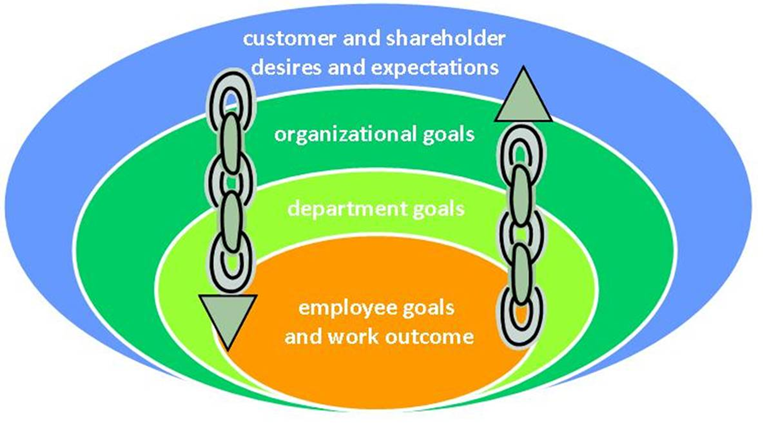
I ask these questions because I frequently conduct course audits for my clients and see a common trend in the audits: The stated learning objectives do not clearly align with business needs. So, how can you go about developing training that supports business needs? In this e-letter you will read about a 4-step checklist to help ensure alignment. But first, a picture to help you see where the steps fit in:
Customer-employee link
Ideally, customer and shareholder desires and expectations will drive organizational goals, which in turn will inform department and employee goals and outcomes. Moving from the inner circle outward, the work performed by employees ideally support department goals, which support organizational goals and meet customer and shareholder desires and expectations. Thus, any interventions (such as training, a new system implementation, or an updated work process) should ultimately support the outer circle.
Often, requests for development of training programs originate from somewhere in the inner circles. As instructional designers, curriculum developers, and organizational development practitioners, it is our responsibility to ensure alignment of training with business needs. Use this checklist to help ensure alignment.
Sam: An SME Story
For the past two months you’ve been working with Sam, your Quality Assurance expert. He’s provided you content you need for a course you’re developing although it’s been challenging to get his time and commitment. Now you are in the final review phase and must have Sam’s input. You’ve sent two e-mails and received no reply.
Does this sound familiar? You could ask, “What should I do next?” But, I’d rather focus on, “What should I do next time?” and look at the process more holistically.
Instructional designers often need to work with experts in a particular content area. These are our subject matter experts (SMEs). We need SMEs when we are asked to develop a course in a field in which we may not have expertise. For example, when developing a course on managing risk, budgeting, or delivering performance reviews, we need to obtain job-specific content from someone in the Risk Management, Finance, or Human Resources groups.
One of the challenges of identifying and working with SMEs who will meet the needs of your project is their “expert” status–they are very good at what they do and so are often called upon from other parts of the business to participate on task forces, project teams, and other special assignments. And, of course, they also need to perform their “regular” jobs. Where does that leave you when competing priorities pull the SME away from your training project?
In this post we provide a checklist: What to look for in an SME and, at least as important, how you can prepare and support your SME. Check out our SME Checklist.
At project close, be sure to thank your SME and show appreciation for the work your SME performed. Based on the SME’s personal style, you may choose a private thank you (such as a personal note) or a more public acknowledgement (an article in a corporate newsletter highlighting your SME’s role or a note to the SME’s divisional director, for example).
The next time you engage a subject matter expert try sharing this checklist, or parts of it as appropriate to your situation, with your SME.
Making Instructional Design REAL
Have you ever sat through a course that was not engaging and had minimal activities? How much information did you retain?
Worse yet, have you ever delivered a course, and the participants seemed bored and uninterested? Here is a model for making instructional design REAL.
R is for reality-based
This is critical. Be sure your course teaches what the audience needs and the audience needs what is being taught and they will use what they learn very soon. If learning is too theoretical or won’t be applied within days, re-evaluate your approach. Considering the following information during the needs assessment phase will help ensure the course is pertinent and timely:
- Who is the target audience?
- What do they need to do differently on the job?
- When do they need to start doing it?
- What are the consequences if they don’t perform to the new standards?
- What might be preventing their success?
- Do all members of the target audience need to know the same information and perform the same skills?
E is for engaging
Learners want to be engaged and need to easily understand how what they are learning is meaningful to them. So, design engaging interactions throughout the course that address this need. You can set the stage by starting out with “what’s in it for me” information.
For example, if you are delivering a course on writing performance reviews you could post a flip chart listing challenges commonly faced by managers writing reviews. As participants enter the classroom, ask them to check off all those challenges they’ve encountered and to add any not listed. You now know which topics to emphasize.
Remind learners throughout the course how the content will benefit them. Better yet, have learners tell you! For example, after you’ve identified and practiced ways to manage a challenging employee situation during a performance review discussion, you could ask learners, “How will this be helpful to you?” Eliciting just a couple of responses will help engage your audience and get them thinking about how they will use the knowledge and skills being taught.
A is for action-oriented
Action-oriented design, quite simply, helps learners learn. It also helps them process and apply what they are learning thus increasing learning effectiveness. Ideally, you will include a significant activity relating to each learning objective. Consider the following as you design your course:
- Are participants working in activities for at least half the class? If not, think of more ways to have learners apply the concepts and skills being taught.
- Activities where learners need to move around helps the learning process even more. For example, if you are teaching about a work process, have learners recreate the process flowchart by standing in the correct order around the room based on their assigned step. Then ask them to explain what is involved in their step and what data or items are passed to the next step.
- At a loss for an activity? After covering a topic, ask pairs to summarize three key points they just learned, or ask them to state one thing they’ll do differently at work.
L is for learner-focused
As the instructional designer (or the instructor), it is your job to focus on the learner’s perspective rather than trainer’s. Turn courses with lots of lecture (or, in elearning, lots of reading) into learner-centric events. Consider the following questions:
- Are you eliciting information from the learners, leveraging what they already know and reinforcing that knowledge?
- How are learners practicing required job skills in a safe classroom environment?
- What concerns does the learner have about the new information? How is that being addressed in the course?
Making it REAL—Reality-based, Engaging, Action-oriented, and Learner-focused—is one way to help ensure your course design will be effective. Use the REAL checklist anytime you design a course.
Align your STARS – The People Who Make It Work
Even the most experienced trainers and instructional designers face challenges in their roles when the people supporting their jobs are not in place. Here are some of the critical people who help make your training project a success, your STARS:
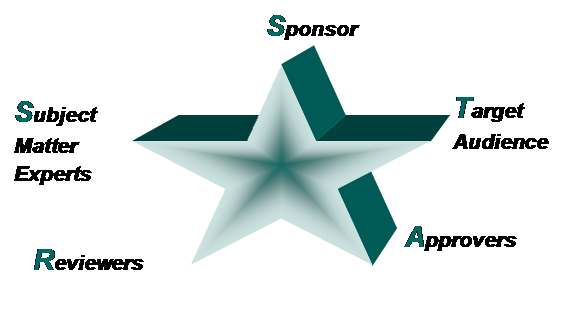
You may work with most or all of these groups of people on any training project. We’ve defined their roles below, with key questions to ask yourself about the partners in your endeavor and recommended critical actions to help ensure project alignment.
- Your project sponsor is usually the person requesting and possibly paying for the training.Is your sponsor committed? Will your sponsor provide all the resources you’ll need to complete the project on time? At the beginning of the project, meet with your sponsor to review his or her expectations and what support you will need to meet those expectations. This conversation should include the business rationale for the training and set the stage for ongoing communication during the project. Your sponsor may help you identify the rest of your STARS.
- The target audience includes individuals who will receive the training—or their representatives. Keep this group in mind throughout the design and development process—avoid letting subject matter experts (SMEs), the sponsor, or the approver speak solely on their behalf! Have you scheduled a pilot comprised of your target audience to give you valuable and necessary feedback regarding content appropriateness and training effectiveness? Remember to keep diversity in mind; involve target audience members from a variety of work sites, departments, and experience levels. Include some of the target audience in the review process.
- The approver is usually one of the subject matter experts who is responsible for reviewing all course materials and signing off on final versions. You may ask the approver to assess all reviewer comments and provide you with the final change requests. Is the approver in a position to decide on conflicting reviewer change requests and to respond to and resolve business questions that impact the training? Will the other resources accept the approver’s decisions? It is best to have one approver. However, if you have multiple approvers, agree in advance on a method to obtain final approval. This may be through an online collaboration and communication or an in-person meeting among all the approvers, for example.
- Reviewers are individuals you, your sponsor, and subject matter experts have identified to review and comment on all the training materials at key points during design and development. Do reviewers represent all stakeholder groups (e.g., line of business the training targets, finance, human resources, and legal)? Have you communicated the expectations to reviewers, and are they on board? You can use a number of methods to collect reviewer feedback, and you will need to determine which method works best for your team. Ideally, you will end up with one document of reviewer comments from which the approver decides on final change requests.
- Subject matter experts should be very knowledgeable about one or more topics related to the training. Do you have all content areas covered by one or more SMEs? Sometimes you will need multiple SMEs to cover all aspects of a project. Agree ahead of time which SME is the “lead” decision-making authority for each topic. Are the SMEs committed and engaged? Communicating mutual expectations ahead of time—including project goals and timelines, what you need from the SME and why, estimated time commitment and any planned meetings, and support you will provide—will help SMEs understand their roles. Encouraging the sponsor to deliver this message will go a long way in engaging the SMEs.
One more point: If you are developing instructor-led training, including some of the trainers throughout the design and development phase will help ensure buy-in and a successful delivery. Finding out what works for them will help the instructional designer provide the level of detail needed.
Once you’ve aligned your STARS and have clearly set mutual expectations, you can focus on the design and content of your training.